
SIGNUP INSTRUCTIONS
...for both Swimmers and Parent Volunteers at swim meets.
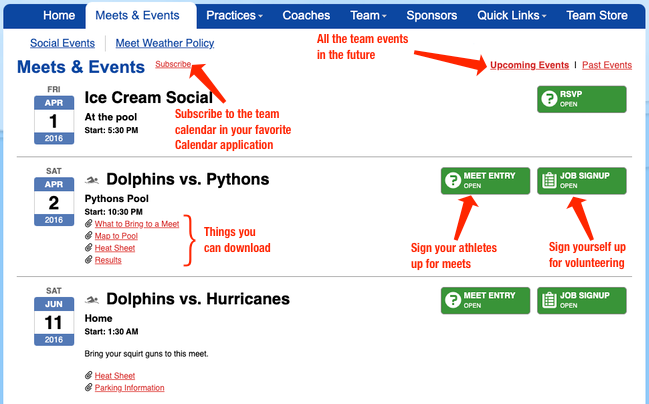
Under the 'Meets & Events' tab in the navigation menu, select 'Team Calendar' to see all upcoming meets. Each meet or event will have buttons specific to a status of open, closed, or pending (no button displays) for job and athlete signup.
Text Area
Simple formatted text


Image
Upload and embed an image
Swimmer/Athlete Signup ("declaration"):
- Click the green MEET ENTRY tab, and then click the green Edit tab under your athletes' names.
- For each of your athletes, select an option from the drop down list next to their names.
- (undeclared)
- Attending
- Not Attending
- Click Save to record your choices.
Job Signup:
- Click the green JOB SIGNUP button and sign up for volunteer shifts (note one parent may sign up both parents for jobs -- scroll down and you’ll see the other parent listed. If you don't see your other parent, reach out to us to fix this in SwimTopia).
- Click Save Assignments.
More Information on volunteer expectations and job descriptions, visit Volunteering 101.
If you need more help, check out the following link for SwimTopia's help guides:
Text Area
Simple formatted text